
Audio software · by Eddy Jones
Six Walls™
A small ai-accelerated audio-software venture that comes at a familiar job from an unfamiliar angle. Free plugins and standalone tools — no account, no catch, no kidding.
Who we are
Six Walls, established in 2026, is one person: Eddy Jones, an Art Institute–trained audio engineer who spent thirty years as a software developer and tester, and is finally putting the two together.
The plugins and apps here all started as a fix for something in a real session: overhead mics with too much shell in them, a reverb that never sounded like an actual room, a Studio One project that grew into a mess of stray media. Each one takes a familiar task and approaches it from a different direction.
Everything is given away for free, built in spare time, and shipped when it’s genuinely useful rather than when a release calendar says so. There’s no company behind it, no account to make, and no telemetry.
What we offer
Two kinds of thing, both free: audio plugins for your DAW, and standalone applications that run on their own.
Plugins
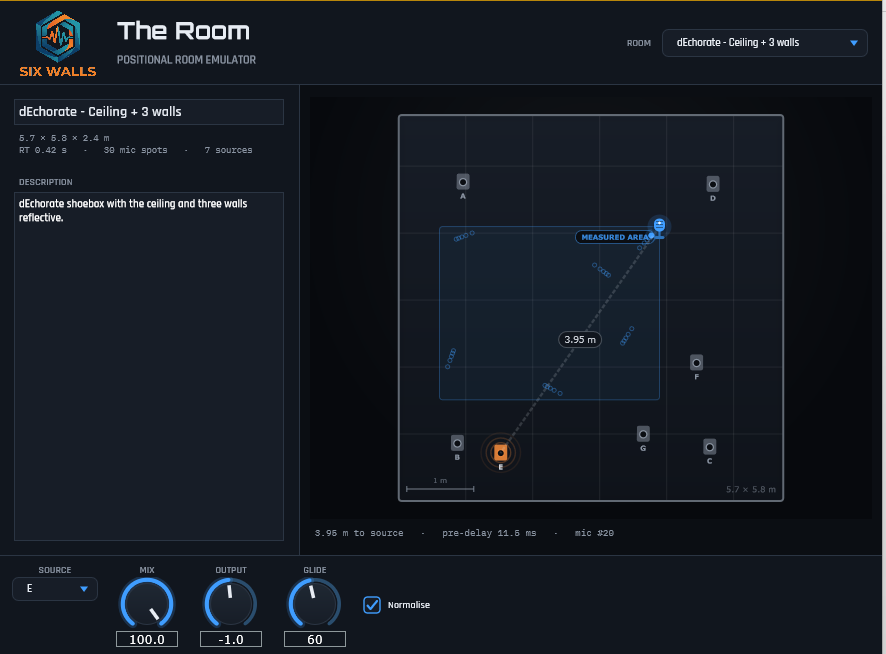
The Overhead(s) reduces kick, snare, and tom bleed in your overheads. The Room is a convolution room emulator you play by dragging the microphone around a measured space. The ThirtySix is a VCA compressor modeled from a real early-’90s rack unit. The NanoFlux is chorus, flange, delay, gated reverb, and rotary from an original NanoVerb (unofficial).
See the plugins →
Standalone apps
The Installer — see what Six Walls software you have and what has an update. Tools for Studio One, a suite that archives, backs up, renames, and path-repairs PreSonus Studio One (and Fender Studio Pro) song projects. And the RA Plugin Manifest Editor, a companion tool for RA Control.
See the apps →

Photo · The Miraculous Love Kids
If Six Walls helped you, pay it forward
Empowering kids, one chord at a time
The Miraculous Love Kids is a 501(c)(3) nonprofit founded by guitarist Lanny Cordola. It brings music education and care to girls growing up amid poverty and war — in Pakistan, and formerly Afghanistan, where it ran the country’s only music school for girls.
Its students have recorded with the likes of Slash, Brian Wilson, and Roger Daltrey. Every Six Walls download is free — if one has earned a place in your setup and you want to give something back, send it here instead. The girls could really use the support.
Grab something
Everything is a free download. Pick a lane.